Ever ordered something online and then refreshed the tracking page every few hours? You’re not alone. Whether it’s an important document, a gift, or a late-night shopping deal, knowing parcel ki location kaise pata karein (how to find your parcel’s location) gives peace of mind.
In 2026, courier tracking is smarter, faster, and more transparent than ever. With real-time GPS updates, SMS alerts, and mobile apps, you can track almost any shipment within seconds. But many people still get confused by tracking numbers, status updates, and delivery codes.
This guide explains everything in simple, clear language so you can confidently track any courier — anywhere in the world.

What Is Courier Tracking and How Does It Work?
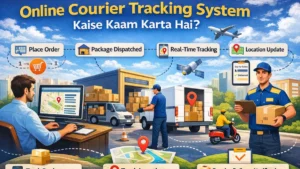
Courier tracking is a system that lets you monitor your parcel’s journey from dispatch to delivery. Every package is assigned a unique tracking number. This number is scanned at different checkpoints like:
• Warehouse pickup
• Regional sorting center
• Out-for-delivery hub
• Final delivery location
Each scan updates the courier company’s system, which you can view online.
Major global carriers such as UPS, FedEx, DHL, and USPS use barcode and GPS-based systems to provide near real-time updates. Most domestic courier companies follow the same process.

Parcel Ki Location Kaise Pata Karein: Step-by-Step Guide
Tracking your parcel is easy if you follow the right steps.
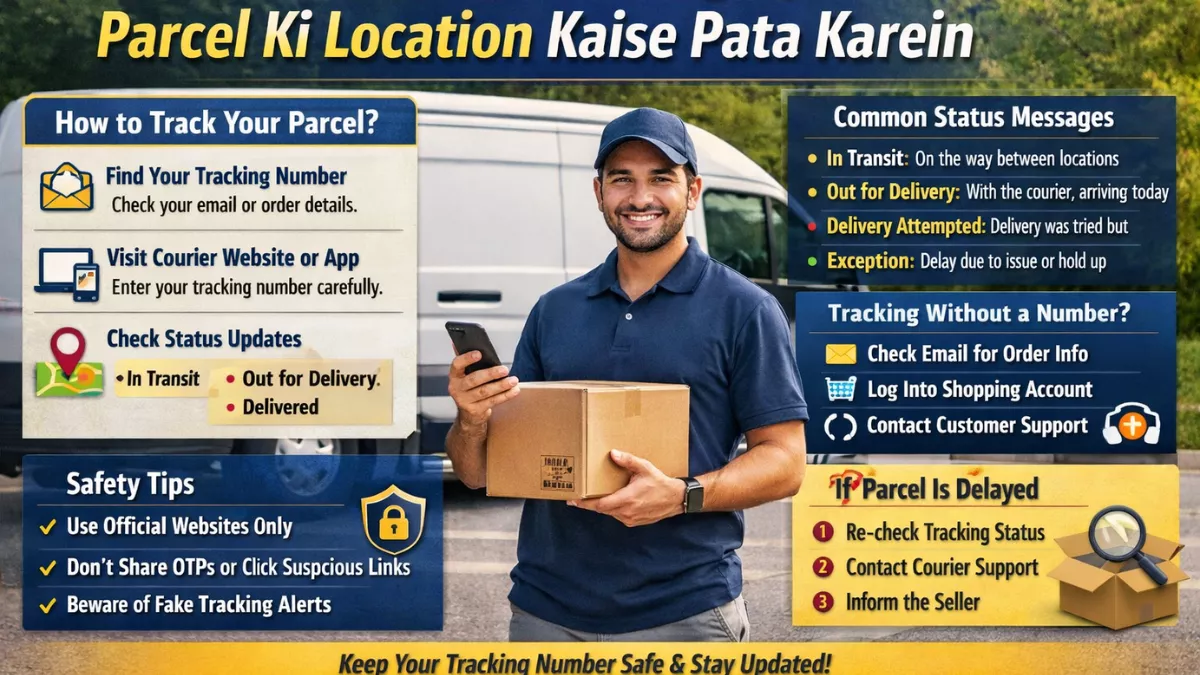
Step 1: Find Your Tracking Number
You can find the tracking number in:

• Order confirmation email
• SMS from the courier company
• E-commerce app order history
• Printed receipt (if booked offline)
Tracking numbers are usually 10–20 characters long and may include letters and numbers.

Step 2: Visit the Courier Company’s Official Website or App
Go directly to the official website or mobile app of the courier company handling your parcel.
For example:
• If your order is from Amazon, check inside your Amazon account.
• If it’s shipped via UPS or FedEx, use their tracking page.
Enter the tracking number carefully — even one wrong digit will show an error.
Step 3: Check Real-Time Status Updates
Once entered, you’ll see shipment details such as:
• Shipment booked
• In transit
• Arrived at sorting facility
• Out for delivery
• Delivered
Some couriers also show estimated delivery time and live delivery maps.
Understanding Common Tracking Status Messages
Tracking updates can sometimes be confusing. Here’s what they actually mean:
In Transit
Your parcel is moving between facilities. It may not update daily if traveling long distances.
Out for Delivery
The package is with the delivery agent and should arrive the same day.
Delivery Attempted
The courier tried delivering but couldn’t. Check for missed calls or reschedule.
Exception
There’s an issue such as weather delay, incorrect address, or customs hold.
Delivered
The package has been successfully handed over.
Understanding these terms prevents unnecessary panic.
How to Track a Parcel Without a Tracking Number
Lost your tracking number? Don’t worry. You can still try these options:
• Check your email inbox for confirmation messages
• Log into the shopping platform account
• Contact customer support with your order ID
• Use your phone number (some couriers allow tracking via mobile number)
However, without a tracking number, tracking may be limited.
Mobile Apps vs Website Tracking: Which Is Better?
Both methods work, but mobile apps offer extra convenience:
• Push notifications for status updates
• Live map tracking in some cities
• Delivery rescheduling options
• Direct chat with support
Websites are useful if you don’t want to download apps, especially for one-time tracking.
International Courier Tracking Tips
Tracking international parcels involves additional steps because of customs and cross-border scanning.
Here’s what to know:
• Customs clearance can add 2–5 days
• Tracking updates may pause during international transit
• Local courier partners may handle final delivery
For example, an international package shipped from the US to India might start with one courier and end with another local delivery partner.
Always check if the tracking number works on the destination country’s postal website as well.
Why Your Tracking Information Isn’t Updating
Sometimes tracking appears stuck. Common reasons include:
• Weekend or holiday delays
• Long-distance transport between hubs
• Technical scanning delay
• Weather disruptions
• Customs inspection
In most cases, updates resume within 24–48 hours.
If there is no update for more than 3–4 business days, contact the courier.
Safety Tips While Tracking Your Parcel
With increased digital activity, scams are also rising. Protect yourself by following these tips:
• Only use official courier websites
• Never share OTP or verification codes
• Avoid clicking suspicious tracking links in unknown messages
• Verify sender details before making any payment
Courier companies do not randomly ask for payment via unofficial links.
Trend Update: Smarter Tracking in 2026
The logistics industry has adopted AI-driven route optimization and predictive delivery windows. Many courier services now:
• Provide 1–2 hour delivery slots
• Offer live driver tracking
• Use automated SMS updates
• Enable digital proof of delivery with photo capture
These improvements reduce delivery anxiety and increase transparency.
What to Do If Your Parcel Is Delayed or Lost
If your package is delayed:
- Wait 24 hours after the expected delivery date
- Re-check the tracking status
- Contact courier support
- Inform the seller if purchased online
If marked delivered but not received:
• Check with neighbors or security
• Look for proof-of-delivery photo
• Contact support immediately
Most courier companies initiate investigation within 48 hours.
Quick Checklist for Smooth Courier Tracking
• Save your tracking number
• Use official apps/websites
• Monitor status daily
• Keep your phone active for delivery calls
• Contact support if no update for 3+ days
Following this checklist avoids confusion and delays.
Summary: Stay Informed, Stay Stress-Free
Tracking your parcel doesn’t have to be confusing. With the right tracking number and access to official platforms, you can monitor your shipment from dispatch to doorstep.
Key takeaways:
• Always keep your tracking number safe
• Use official courier websites or apps
• Understand status messages correctly
• Stay alert for scams
• Contact support if updates stop for several days
With smarter logistics systems in 2026, parcel tracking is more transparent than ever. A little awareness ensures your package reaches you without stress.
FAQs
Q1: How can I track my parcel online?
Enter your tracking number on the courier’s official website or mobile app to see real-time shipment updates instantly.
Q2: What if my tracking status is not updating?
Wait 24–48 hours; delays may occur due to transit gaps, weekends, weather, or customs processing.
Q3: Can I track a parcel without a tracking number?
You can try using your order ID, phone number, or contact customer support for assistance.
Q4: What does “Out for Delivery” mean?
It means your parcel is with the delivery agent and will likely arrive the same day.
Q5: What should I do if my parcel shows delivered but I didn’t receive it?
Check nearby areas, ask neighbors, review proof of delivery, and contact courier support immediately.