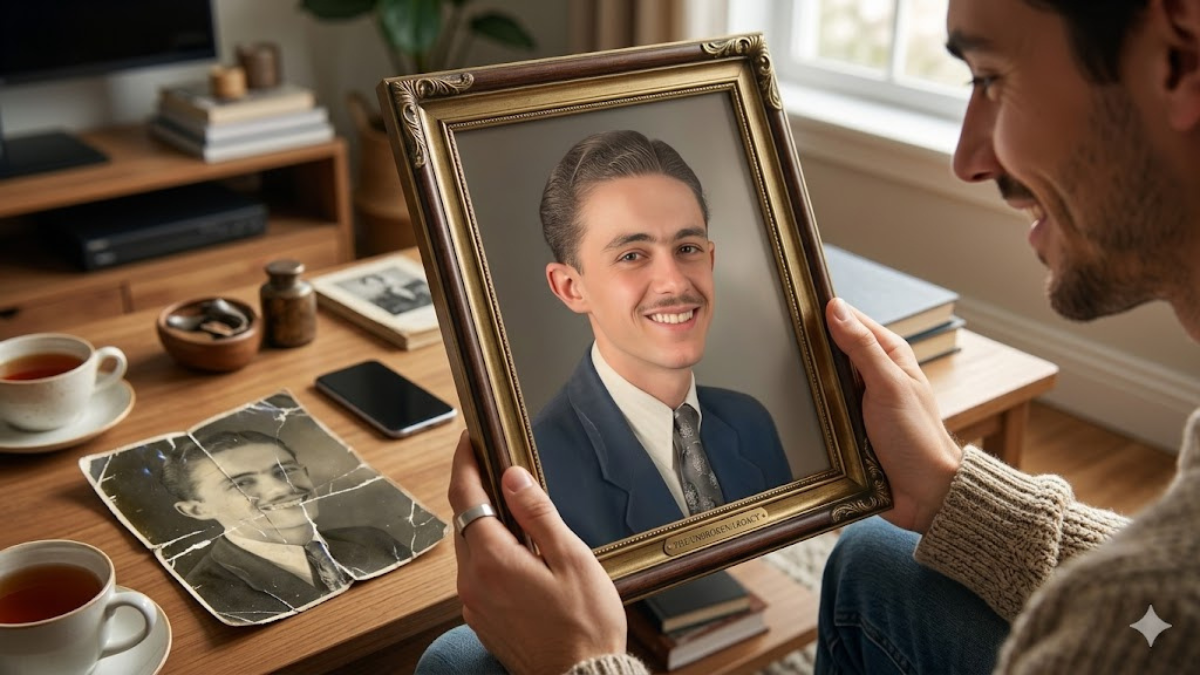
Many people have old family photographs that hold priceless memories. Unfortunately, time often damages these photos. They become faded, scratched, blurry, or torn, making it difficult to see the people and moments clearly.
Traditional photo editing software can be complicated, and professional restoration services are often expensive. This is where AI tools like Google Gemini are changing everything.
With the right AI prompts, you can restore old photos in minutes. You can remove scratches, enhance faces, fix colors, and even recreate missing details while keeping the image natural and authentic.

In this guide, you will discover 5 powerful Google Gemini AI prompts that can help restore old photos and bring your precious memories back to life.
Why Most People Struggle to Restore Old Photos
Even though AI tools are powerful, many people still struggle to get good results. The main reason is poor prompts.
Most users write very simple prompts like:
“Restore this old photo.”

The problem is that AI needs clear and detailed instructions. Without enough detail, the results may look over-edited, unrealistic, or blurry.
Another issue is that people forget to specify lighting, textures, colors, and photographic quality. These elements help AI create more natural and realistic restorations.

That’s why using well-structured prompts can dramatically improve your results.
1. AI Prompt to Repair Scratches and Damage
Old photographs often have scratches, cracks, and physical damage. This prompt helps Gemini intelligently repair those areas.

Prompt
Restore this damaged vintage photograph by carefully removing scratches, dust, and cracks while preserving the original facial features and textures. Reconstruct missing details naturally and maintain authentic skin tones. Use soft cinematic lighting with balanced highlights and shadows to enhance realism. Apply ultra-realistic textures, natural color correction, professional photography style, and subtle depth of field. The final image should appear clean, sharp, and historically accurate with 8K ultra-high resolution quality.
Why this prompt works
This prompt tells the AI exactly what to fix while preserving the authentic look of the original photo. The lighting and texture instructions also prevent the image from looking artificial.
2. AI Prompt to Restore Faded Colors
Many old photographs lose their colors over time and look dull or washed out.
Prompt
Enhance and restore the faded colors of this old photograph while keeping the tones natural and historically accurate. Carefully rebuild the color balance of skin, clothing, and background elements. Use cinematic soft lighting with gentle highlights and realistic shadows. Maintain ultra-realistic textures and natural skin tones while improving clarity. Apply professional photography style color grading, subtle depth of field, and realistic contrast. Output should look vibrant yet natural with crystal clear 8K resolution quality.
Why this prompt works
The AI focuses on color restoration without over-saturation, which keeps the image realistic and respectful of the original photograph.
3. AI Prompt to Sharpen Blurry Old Photos
Some old photos become blurry due to camera limitations or aging prints.
Prompt
Improve the clarity of this blurry vintage photograph by intelligently sharpening facial details, clothing textures, and background elements. Reconstruct fine details naturally without making the image look artificial. Use cinematic lighting with balanced contrast and soft shadows to enhance depth. Maintain ultra-realistic textures and natural colors while improving overall sharpness. Apply professional portrait photography enhancement, subtle depth of field, and clean noise reduction. Final output should appear crisp, detailed, and professionally restored in 8K ultra-high resolution.
Why this prompt works
This prompt instructs AI to enhance clarity while keeping the photo natural, avoiding the overly sharpened look common with simple edits.
4. AI Prompt to Restore Faces in Old Portraits
Faces are the most important part of family photographs. AI can rebuild missing facial details if prompted correctly.
Prompt
Carefully restore and enhance the faces in this old portrait photograph while preserving the natural identity and expressions of the people. Rebuild missing or blurred facial details such as eyes, skin texture, and hair naturally. Use soft cinematic portrait lighting with realistic shadows and highlights. Maintain ultra-realistic skin textures, natural colors, and professional studio photography style. Add subtle depth of field to improve subject focus. Final result should look lifelike, detailed, and naturally restored in 8K high-resolution quality.
Why this prompt works
This prompt prioritizes facial realism and identity preservation, which is critical when restoring family photos.
5. AI Prompt to Fully Restore a Vintage Photo
If your photo has multiple issues like scratches, fading, and blur, this prompt handles complete restoration.
Prompt
Fully restore this damaged vintage photograph by repairing scratches, removing dust marks, enhancing clarity, and reconstructing faded areas. Carefully balance colors to maintain natural skin tones and realistic backgrounds. Use cinematic lighting with smooth highlights and soft shadows to improve depth and realism. Preserve ultra-realistic textures while applying professional photography style enhancement. Add subtle depth of field and realistic contrast to bring the image to life. The final output should look clean, detailed, and beautifully restored in 8K ultra-high resolution quality.
Why this prompt works
This prompt combines multiple restoration instructions, making it perfect for photos that need a full transformation.
Helpful Tips to Get Better AI Restoration Results
Even with great prompts, a few smart techniques can significantly improve results.
1. Use the Best Photo Scan Possible
Always scan your photo at high resolution before uploading it to AI tools. A better scan gives AI more data to work with.
2. Crop Before Restoring
If the photo contains unnecessary borders or damage, crop it first. This helps the AI focus on the important parts.
3. Test Multiple Prompts
Sometimes slightly different prompts produce better results. Don’t hesitate to experiment with variations.
4. Restore in Stages
Instead of fixing everything at once, try:
- Scratch removal
- Color restoration
- Face enhancement
This often produces more natural results.
5. Avoid Over-Editing
Too much sharpening or color enhancement can make the photo look artificial. Always aim for natural restoration.
Why AI Photo Restoration Is Trending in 2026
AI photo restoration is becoming extremely popular in 2026, and there are several reasons behind this trend.
First, millions of people are digitizing family photo albums to preserve memories. AI tools allow them to restore those images quickly.
Second, advanced AI systems like Google Gemini now understand faces, textures, lighting, and historical details better than ever before.
Social media platforms are also driving the trend. Many users are sharing “before and after” restoration videos, which often go viral.
Finally, AI restoration is helping people reconnect with the past. Seeing a clear photo of grandparents or childhood memories can be incredibly emotional and meaningful.